fiberis.moose: Programmatic MOOSE Input Generation
This note introduces the fibeRIS simulator → MOOSE extension. For installing the MOOSE environment itself, see my fiberis.moose setup post.
The PorousFlow module
MOOSE has lots of pre-defined modules. In my project we use the THM model’s module, which is called porous flow. Its governing equation is:
\[0=\frac{\partial M^\kappa}{\partial t} + M^\kappa \nabla\cdot \mathbf{v}\]- $M$: mass of fluid per bulk volume
- $v_s$: velocity of the porous solid skeleton
- $F$: flux
- $q$: source
(For the full derivation, see my PorousFlow governing equations post.)
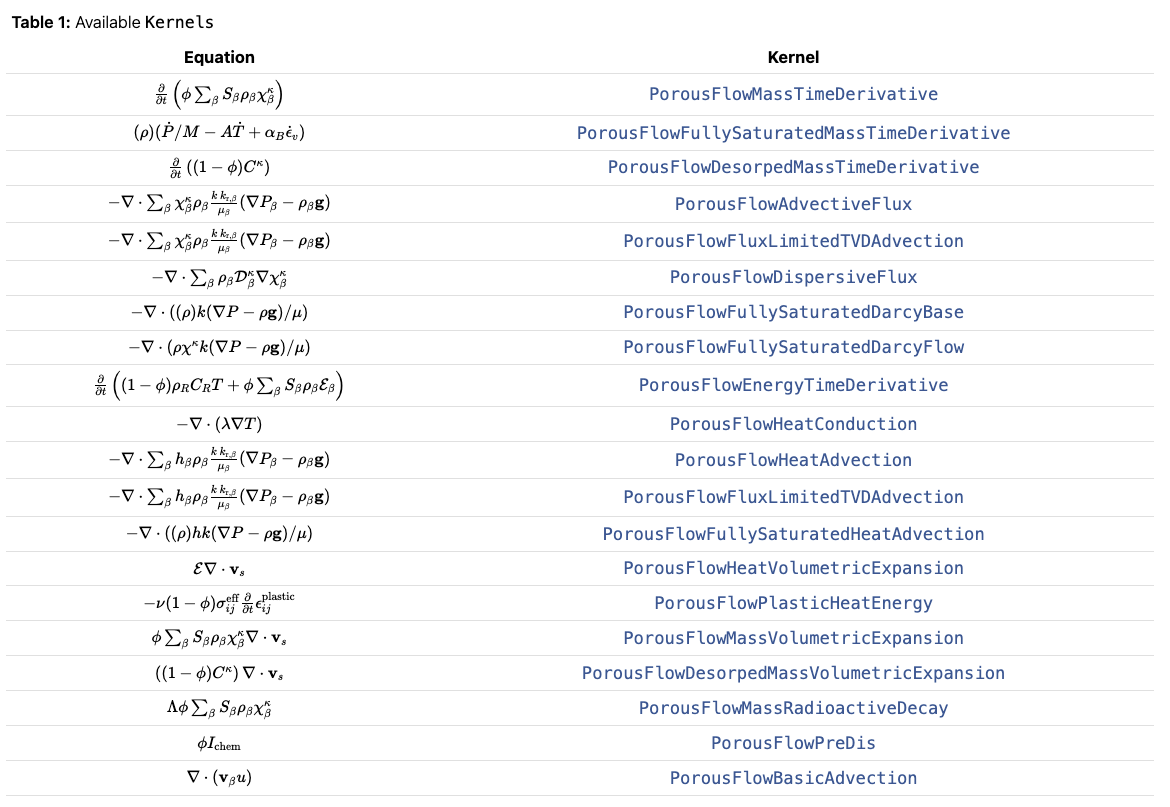
The kernels involved in porous media diffusion:
MOOSE extension: modules
The fibeRIS MOOSE extension provides a comprehensive suite of tools for interacting with the MOOSE framework, enabling programmatic control over simulation workflows. For a detailed overview, refer to the fibeRIS MOOSE Extension README.
- Configuration (
config.py): defines Python classes (HydraulicFractureConfig,SRVConfig) to specify parameters for hydraulic fractures and stimulated reservoir volumes. - Input file generation (
input_generator.py): generates MOOSE input files (.i) from Python dictionary configurations. Includes theMooseBlockbase class. - Model building (
model_builder.py): a higher-level API to construct MOOSE input files using the configuration objects, simplifying the definition of physical features and mesh operations. - Input file editing (
input_editor.py): allows reading, modifying, and writing existing MOOSE input files usingpyhitandmoosetree. - Simulation execution (
runner.py): programmatically runs MOOSE simulations, captures output, and manages the execution process, including MPI support. - Post-processing (
postprocessor.py): reads MOOSE output files (primarily Exodus.efiles) usingmeshioand extracts data for analysis. Note: it is not used anymore, for I have integrated all visualization code intofiberis.analyzer.
Mesh refinement
v1: targeted refinement + AMA (superseded)
- No implementation of the original mesh grid refinement — only the HF/SRV refinement is kept.
- AMA will be implemented.
- This is the old state of the art for mesh setup. Now please refer to v2.
My strategy combines initial targeted discretization with dynamic mesh adaptation:
- Targeted initial refinement: key features like hydraulic fractures and stimulated reservoir volumes (SRVs) receive user-specified initial refinement, using parameters in the
HydraulicFractureConfigandSRVConfigobjects, which interface with MOOSE’sRefineBlockGenerator. - Reasonable base matrix discretization: the main reservoir matrix starts with a user-defined, reasonably coarse mesh.
- Automatic Mesh Adaptivity (AMA): dynamically refines or coarsens the mesh based on evolving solution features (error indicators, gradients of pressure, displacement, stress). This focuses computational effort where needed, such as propagating fracture tips or areas with sharp fluid flow changes.
v2: stitched, biased mesh (current)
Change in v2: I realized MOOSE will not accept the mesh without refining. We must do refinement on the mesh.
The mesh setup handles multiple hydraulic fractures. The model builder constructs a 2D mesh directly within the MOOSE framework, tailored for simulating multiple horizontal hydraulic fractures. The process begins by creating a series of horizontal layers using MOOSE’s GeneratedMeshGenerator. For each layer that will contain a fracture, two sub-layers are generated with a bias_y parameter, creating a finer mesh resolution around the fracture’s centerline. These sub-layers are then seamlessly joined using the StitchedMeshGenerator. This process is repeated and chained together to form a single, continuous base mesh with inherent local refinement along all specified fracture paths.
Following the base mesh construction, distinct material regions are defined not by geometric cutting, but by assigning block IDs. The SubdomainBoundingBoxGenerator identifies regions for hydraulic fractures and SRVs by marking all mesh elements that fall within user-defined bounding boxes. To further enhance accuracy, the RefineBlockGenerator can be selectively applied to these named blocks. Finally, blocks and boundaries are assigned descriptive names using RenameBlockGenerator and SideSetBoundingBoxGenerator, ensuring a well-organized and readable input file for the MOOSE solver.
The .i file generator: a two-tiered architecture
The MOOSE framework relies on a detailed, block-structured input file syntax (.i files) to define complex simulation problems. While powerful, manual creation of these files can be verbose, error-prone, and inefficient for large-scale parameter studies or complex geometries. The fiberis.moose package implements a two-tiered software architecture to address this challenge, providing both a foundational, syntax-direct API and a high-level, domain-specific abstraction layer.
Tier 1 — the foundational API: input_generator.py
The primary design goal of input_generator.py is to provide a low-level, object-oriented representation of the MOOSE input file syntax. This ensures maximum flexibility, as any valid MOOSE block can be programmatically constructed.
The central component is the MooseBlock class, a direct proxy for a generic [...] block in the MOOSE input file:
- Representation: an instance corresponds to a single block, such as
[Mesh],[Variables], or a sub-block like[./diffused]. - Parameters: the class stores any number of key-value parameters, rendered as
key = valuepairs, intelligently formatting values (booleans totrue/false, lists to space-separated strings). - Nesting: a
MooseBlockcan contain otherMooseBlockinstances as sub-blocks, replicating the nested structure of the input file. - Rendering: a
render()method traverses the object tree and generates the final, correctly indented string representation.
# Direct construction using MooseBlock
from fiberis.moose.input_generator import MooseBlock

# Create the sub-block for the 'pp' variable
var_sub_block = MooseBlock("pp")
var_sub_block.add_param("initial_condition", 2.64E7)

# Create the top-level [Variables] block
variables_block = MooseBlock("Variables")
variables_block.add_sub_block(var_sub_block)

# Render to string
# print(variables_block.render())
This approach is powerful but verbose. For complex simulations, building the entire input file this way would be tedious — which leads to the second tier.
Tier 2 — the high-level abstraction: model_builder.py
The ModelBuilder class acts as a high-level, domain-specific API. It leverages the foundational input_generator but abstracts away the need to manually create MooseBlock objects and manage syntax, exposing an intuitive, physics-aware interface for building poromechanics simulations.
Key architectural features:
- Fluent interface: methods are chainable, resulting in readable, self-documenting scripts.
- Configuration objects: the builder works with data classes defined in
fiberis.moose.config(e.g.,HydraulicFractureConfig,ZoneMaterialProperties), separating the “what” (physics and geometry) from the “how” (MOOSE syntax). - Intelligent automation: methods like
build_stitched_mesh_for_fracturesautomate the complex process of generating a layered mesh with seams at fracture locations — a task that would require dozens of manual block definitions. - Domain-specific helpers: methods like
add_poromechanics_materialsandset_hydraulic_fracturing_bcsgenerate entire collections of[Materials]or[BCs]blocks with validated, standard configurations.
# High-level, abstracted construction
from fiberis.moose.model_builder import ModelBuilder

builder = ModelBuilder(project_name="MySim")

# Add variables with a single, intuitive call
builder.add_variables([
    {"name": "pp", "params": {"initial_condition": 2.64E7}},
    "disp_x",
    "disp_y"
])

# Build a complex mesh with another single call
builder.build_stitched_mesh_for_fractures(
    fracture_y_coords=[300.0, -400.0],
    domain_bounds=(-500, 500),
    domain_length=1000.0
)

# builder.generate_input_file("my_simulation.i")
Why this design
- Layered abstraction: a clear separation of concerns. The low-level
input_generatoris concerned only with syntax; the high-levelModelBuilderis concerned with the physics and structure of the simulation. - Power and flexibility: users can operate at the high level for 95% of their needs. When a rare or custom MOOSE feature is required, they can drop down to the foundational
MooseBlockAPI without altering the builder. - Maintainability: new physics or features can be added to the
ModelBuilderas new methods without changing the core syntax-generation engine.
Set up fiberis
- Install MOOSE (see the setup post)
- Link
PYTHONPATH=moose_env/moose/pythonto the system path - Install fiberis from
pip
Enjoy Reading This Article?
Here are some more articles you might like to read next:
- Permeability Imaging via DSS Strain Inversion (Research Log)
- History Matching with DSS: Is Diffusion Linearly Additive?
- How to deploy a blog using the code in this repository?
- MOOSE PorousFlow: Governing Equations
- Dialogue Log: Debugging a MOOSE Script with Gemini
- fiberis.analyzer philosophy
- fiberis.moose setup
- Cement Shrinkage and Microannulus Formation in Horizontal Wells
- Pressure Diffusion in Fractured Media
- Poisson's ratio test python code